
Football Manager 26, the latest installment in the popular series, was released just a few hours ago and has already drawn in tens of thousands of players. The game includes an in-game editor, allowing players to customize their footballers’ attributes. However, some users are finding this editor difficult to use. If you’re struggling to figure it out, check out our helpful guide!
How to use Football Manager 26 in-game editor to edit players
- Sadly, the first step to use in-game editor is to buy it. It is a DLC that can be purchased in the same store you have bought the base game. It costs 8,99 USD.
- Now, you should create your manager. It is free for all players. However, you can use the in-game editor only if you load the save!
- So, after creating the new game and taking a team under your wing, go to the Squad tab.
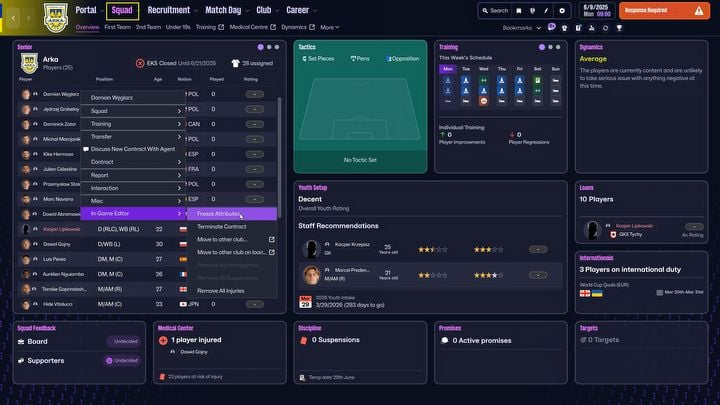
- Now, you can right-click any player you want to edit and see a new option at the bottom of the menu “In-Game Editor” (if you can’t see it, save FM26, close the game and load it). Here you can choose some basic commands – Freeze Attributes, Terminate Contract, Move to other club, Remove all Unhappiness / Suspensions / Injuries. However it is far from over.
- You can click the player to see their detailed description with various stats.
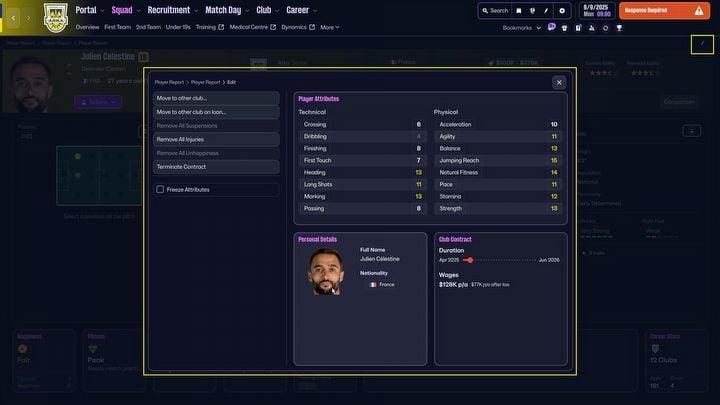
- There is a button in the upper right corner of the screen – edit player. When you press it, it will open the editor in the middle of the screen.
- The editor has 4 sections – the general one (the same you see when you right-click the player on the Sqad screen), Player Attributes (remember that there are various categories of attributes that you can change), Personal Details and Club Contract. After clicking each of them, you will be taken to separate menus that will allow you to further change the footballer.
Read More
- Scientology speedrun trend escalates as viewers map out Hollywood facility
- Where Winds Meet’s new Hexi expansion kicks off with a journey to the Jade Gate Pass in version 1.4
- NBA 2K26 Season 6 Rewards for MyCAREER & MyTEAM
- Vegan nugget startup founder charged with assaulting influencer ex-girlfriend Evelyn Ha
- Makoto Kedouin’s RPG Developer Bakin sample game is now available for free
- MrBeast lets fans from every country vote for Beast Games Season 3 contestants
- How to Get to the Undercoast in Esoteric Ebb
- What Fast Mode is in Bannerlord and how to turn it on
- Exclusive: First Look At PAW Patrol: The Dino Movie Toys
- 10 Best American Turn-Based RPGs of All Time
2025-11-04 22:32