Similar to other remastered Tales games like Tales of Xillia Remastered and Tales of Graces f Remastered, Tales of Berseria Remastered allows you to access the Grade Shop right from the beginning of a new game, without needing to complete a playthrough first. This guide will explain all the available Grade Shop settings in Tales of Berseria Remastered, including what options you can change during a save file.
What is the Grade Shop in Tales of Berseria Remastered
The Grade Shop lets you continue your progress in new games. Everything in the shop costs Grade, and you have a limited amount to spend. Don’t worry about saving Grade – if you use it all, it carries over to your next playthrough! You can also easily turn options on or off as you prefer.
From the beginning of a new game in Tales of Berseria Remastered, you’ll have access to the Grade Shop. This shop allows you to customize your experience with various modifiers and helpful items, letting you adjust the difficulty or even change how the in-game economy works.
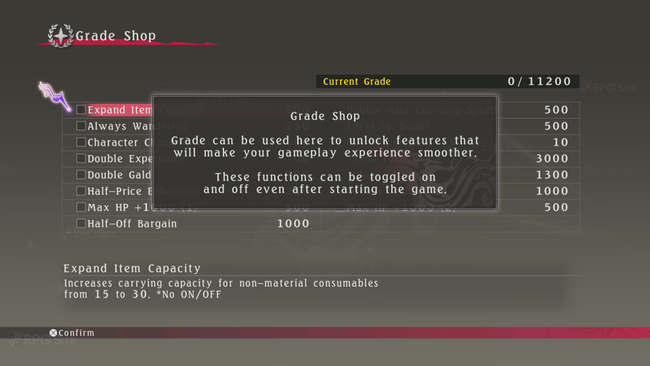
How much Grade do you start with in Tales of Berseria Remastered?
You start with 11200 Grade in the beginning of Tales of Berseria Remastered.
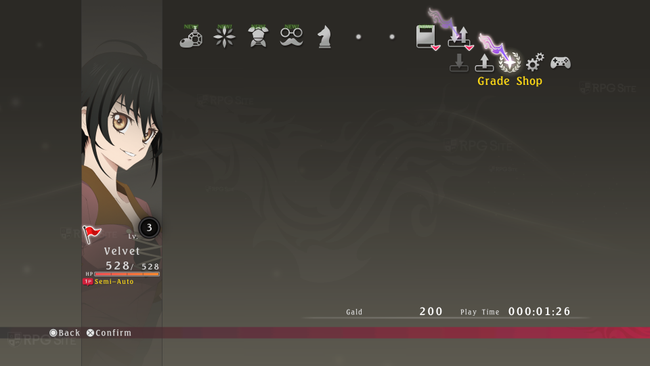
Tales of Berseria Remastered Grade Shop settings and options
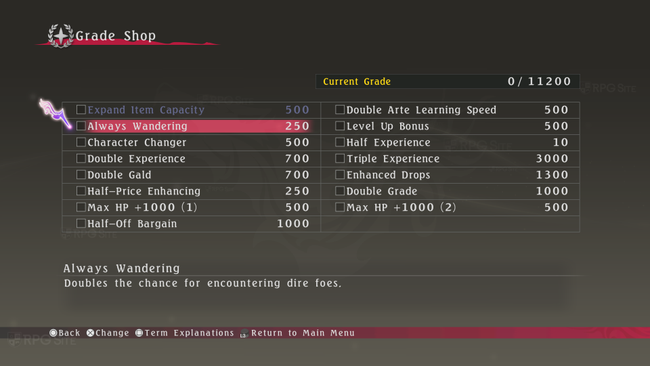
Tales of Berseria Remastered has the following Grade Shop settings available in the beginning:
- Expand Item Capacity – 500 – Increases carrying capacity for non-material consumables from 15 to 30. Note: This cannot be toggled off once enabled on a save file.
- Always Wandering – 250 – Doubles the chance for encountering dire foes.
- Character Changer – 500 – Regenerates 50% of BG used for Switch Blasts, essentially halving the cost for using them.
- Double Experience – 700 – Doubles experience earned. Stacks with “Triple Experience” ot give six times the normal amount of EXP.
- Double Gald – 700 – Doubles the amount of gald earned at the end of battle.
- Half-Price Enhancing – 250 – Halves the amount of gald required to enhance equipment.
- Max HP+1000 (1) – 500 – Increases maximum HP by 1000.
- Half-Off Bargain – 1000 – Buying prices in the shop will be reduced by half.
- Double Arte Learning Speed – 500 – Halves level requirements for learning artes.
- Level Up Bonus – 500 – Adds level-up bonuses to all titles. Some stat increases may be reduced, but they will not go below zero.
- Half Experience – 10 – Experience earned is halved. Defeating enemies while at a lower level increases the amount of Grade earned.
- Triple Experience – 3000 – Triples the experience earned. Stacks with “Double Experience” to give six times the normal amount of EXP. Enhanced Drops – 1300 – Equipment dropped by enemies has a chance of being enhanced.
- Double Grade – 1000 – Doubles the amount of Grade earned at the end of battle.
- Max HP+1000 (2) – 500 – Increases maximum HP by 1000.
Can you adjust the Tales of Berseria Remastered Grade Shop Settings after starting a save file?
So, you can customize the Grade Shop – I can turn features on and off, which is great! But it turns out not everything listed is actually adjustable. It’s a little limited, honestly.
Tales of Berseria Remastered is now available for PS5, Xbox Series, Switch, and PC (Steam).
Read More
- United Airlines can now kick passengers off flights and ban them for not using headphones
- Crimson Desert: Disconnected Truth Puzzle Guide
- All 9 Coalition Heroes In Invincible Season 4 & Their Powers
- The Boys Season 5 Spoilers: Every Major Character Death If the Show Follows the Comics
- Invincible Season 4 Episode 6 Release Date, Time, Where to Watch
- Mewgenics vinyl limited editions now available to pre-order
- Grok’s ‘Ask’ feature no longer free as X moves it behind paywall
- Assassin’s Creed Shadows will get upgraded PSSR support on PS5 Pro with Title Update 1.1.9 launching April 7
- ‘Timur’ Trailer Sees Martial Arts Action Collide With a Real-Life War Rescue
- Grey’s Anatomy Season 23 Confirmed for 2026-2027 Broadcast Season
2026-02-26 18:26