It’s a common scenario: you’re completely focused on a game – maybe in a crucial raid or the final moments of a match – when a friend sends a link on Discord promising a funny video. You click it automatically. These are the moments when you’re most at risk. Surprisingly, the biggest danger to your gaming accounts isn’t sophisticated hackers, but our natural tendencies. We tend to trust our friends and react quickly. This guide will help you improve your awareness and learn to recognize warning signs, making security second nature instead of a tedious task.
Key Takeaways
- Your Gaming Account is More Valuable Than You Think: Hackers are after more than just your rare loot; they target your personal data, financial information, and the trust within your communities. Recognizing the real-world value tied to your account is the first step toward properly defending it.
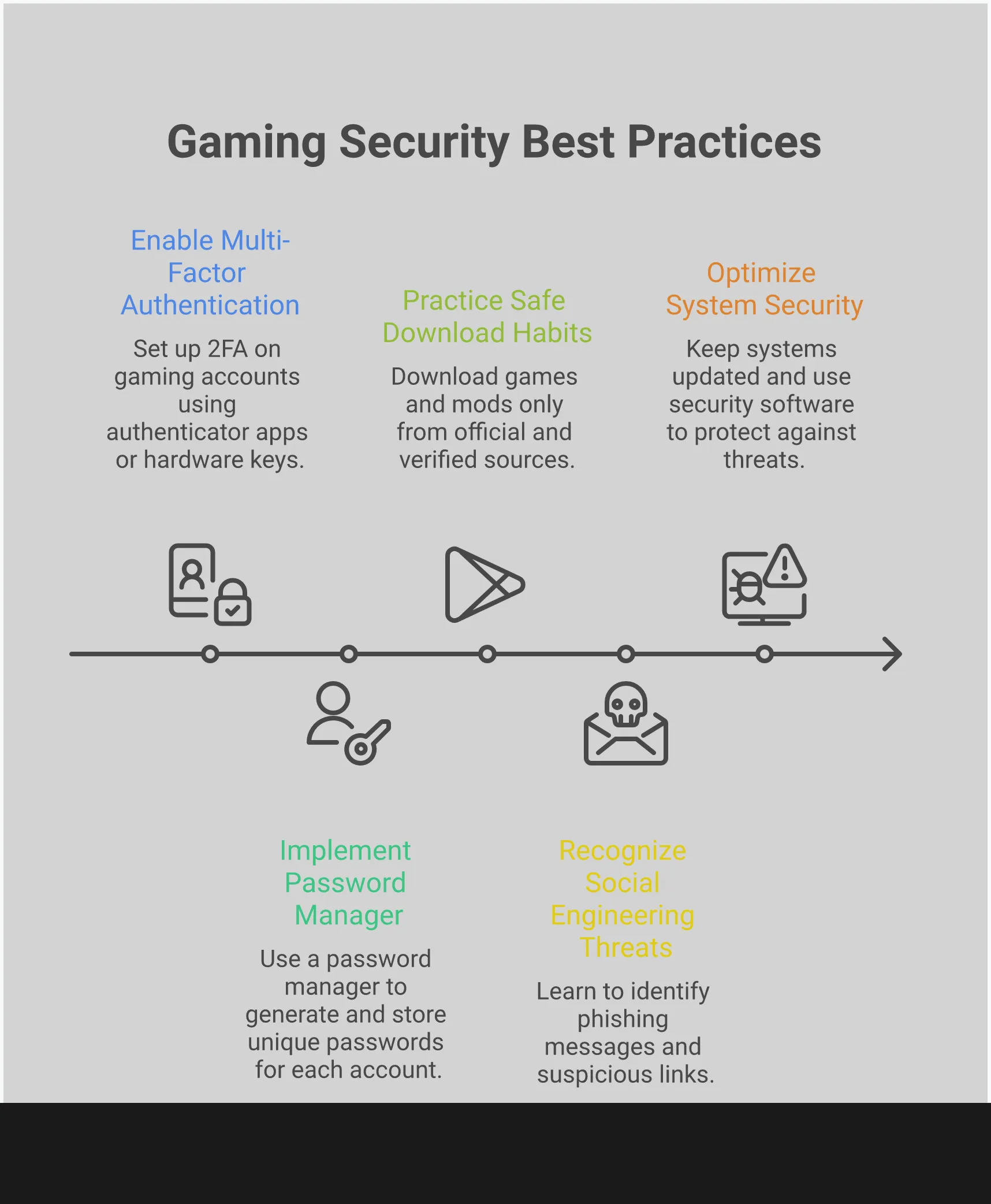
- Master the Three Core Security Habits: The most effective protection comes from a few foundational practices. Use a password manager for unique passwords, enable two-factor authentication (2FA) on every platform, and only download games and mods from official sources.
- Turn Security into a Proactive Reflex: Instead of just reacting to threats, learn to spot them in advance. Developing an instinct for recognizing suspicious links, fake offers, and phishing attempts makes you a much harder target and turns security into a natural part of your gaming routine.
What Makes Your Gaming Rig a Target?
You’ve invested a lot of time and money creating your ideal gaming setup, carefully choosing everything from the graphics card to the lighting. But all that impressive hardware also makes you a target for hackers. It’s not just the power of your computer they’re after – it’s the valuable accounts, personal information, and financial details stored on it. Knowing why hackers target gamers like you is the first step to protecting yourself.
It’s Not Just Your PC: The Human Factor
Even with top-notch antivirus software and strong firewalls, the weakest link in your security is often you. Studies repeatedly show that most security breaches happen because of human error. For example, gamers might click on risky links in chats offering free items, use the same password on multiple sites, or be tricked by fake emails pretending to be from game companies. It’s easy to make a mistake when you’re focused on gaming, but remember that you play a crucial role in staying safe online – you’re not just a bystander.
Common Loopholes Hackers Love
Hackers constantly seek the easiest way to break through defenses, and they’re becoming remarkably skilled at it. They create clever techniques to get around the security measures designed to protect us. It’s like facing an opponent who keeps changing strategies just when you think you’ve learned how they operate. Today’s cybercriminals are using everything from dangerous QR codes hidden in online videos to fake phishing messages created with AI that sound incredibly realistic. They take advantage of our trust and our habit of acting fast, particularly when something seems like a great opportunity. Keeping up with their evolving methods is essential.
The Risks of Being “Always Online”
Gamers are heavily reliant on online connections, and this constant connectivity is making us increasingly vulnerable to cyberattacks. We’re seeing a huge rise in data breaches and ransomware, and the gaming community is a major target. Each time we play online, we share personal and financial information, making gaming companies attractive targets for hackers. The more time we spend gaming online, the greater the risk, so strong security is crucial for both game developers and players.
Why Hackers Are Targeting Gamers
We often picture hackers as going after big companies or governments, but gamers are actually a prime target. It’s not just about annoying other players. Hackers see the gaming world as a way to make money, with valuable items, personal information, and trusting communities that they can take advantage of. They’re not simply trying to mess up your game; they view your account as something potentially very valuable.
To protect yourself effectively, it’s important to understand why gamers are targeted. This isn’t about being overly suspicious, but rather being prepared. You have a lot to safeguard – from valuable in-game items you’ve worked hard to earn, to the personal details linked to your account. Let’s explore exactly what makes gamers attractive targets for malicious actors.
That Rare Loot is a Hacker’s Payday
That amazing sword you finally obtained or that incredibly rare skin you unlocked isn’t just for show—it actually has monetary value. Illegal marketplaces for in-game items are booming, and hackers are exploiting this to steal your digital items and turn them into real money. They can take over your account, steal your most valuable possessions, and sell them before you even notice. As attacks on gaming platforms increase, it’s clear that criminals are starting to view virtual game economies as easy targets for profit. Your time and effort spent earning in-game rewards are essentially being cashed out by others.
You’re More Than Your Gamertag: The Data They’re After
Your gaming account isn’t just about the games you play – it’s connected to your personal information. It probably includes your email, name, and even payment details. This makes it a valuable target for hackers, who could steal your identity, sell your data, or use it to trick you and your friends. Because gaming companies collect a lot of personal data, your account can become a central point for criminals looking to exploit your identity, not just in games, but in real life too.
How Scammers Exploit Trust in Gaming Communities
Gaming is often a social experience where players make friends, join groups, and work together. Unfortunately, scammers take advantage of this community spirit. They pretend to be friends, game officials, or group leaders to deceive you into clicking dangerous links or giving away your account information. They might offer tempting giveaways or trades through private messages. This is a classic manipulation tactic that works by exploiting the trust we build with other players. Learning to spot these tricks is an important skill, just like mastering any other aspect of a game.
Today’s Biggest Threats to Gamers
The idea of hackers as lone figures trying to crack passwords is old news. Modern threats are much more sophisticated and often hide within the gaming communities we enjoy. Hackers now use tricks and deception, taking advantage of our everyday habits, rather than simply trying to guess passwords. Understanding how these threats work is the first step to keeping your accounts, in-game items, and personal information safe. Be cautious of suspicious messages on platforms like Discord and unbelievably good deals on game modifications – these are some of the biggest risks you should be aware of right now.
That QR Code Could Be a Trap
You see QR codes all over the place these days – on live streams, in Discord posts offering special content, and even within games. But even though they seem safe, they’re becoming a popular tool for scammers. The problem is, you don’t know where a QR code will take you until after you scan it, which makes it easy for criminals to send you to fake websites designed to steal your information or trick you into downloading harmful files. Security experts have seen a huge increase in these types of scams, as criminals use QR codes to get around email security. So, be careful before scanning a code promising something free, like a game item or key. Always check where the code is coming from and make sure it’s a trustworthy, official source before you scan it with your phone.
Is Malware Hiding in Your Downloads?
It’s tempting to download games from websites other than official stores to save money or play them sooner, but these downloads are often filled with hidden malware. Cybercriminals are skilled at disguising malicious software within seemingly legitimate game files. Recent findings show attackers are always discovering new methods to infect your devices – whether it’s your computer or gaming console. This malware can range from stealing your passwords by recording your keystrokes to taking control of your device to use in a botnet. To stay safe, always download games and software directly from official sources like Steam, Epic Games, or the game developer’s website.
The Danger of Fake Mods and Cheats
Trying to get an advantage or personalize your game can be risky. Many gamers accidentally download fake mods or cheating programs, which are common sources of viruses. These programs often trick you into turning off your security software or giving them broad access to your computer, making it easy for malware to get in. Some are even designed to disable your antivirus protection. Always check if a mod is safe by downloading it from reputable sources like Nexus Mods or the Steam Workshop, and see what other players are saying about it first.
Watch Out for Discord Scams
Discord is a popular place for gamers to connect, but unfortunately, it also attracts scammers. You’ve likely encountered scams like messages from “friends” with suspicious links, fake announcements offering free Nitro, or giveaway bots for contests you didn’t join. These tricks are designed to steal your account information or get you to approve harmful apps. Staying aware of online security is crucial. Be cautious of unexpected direct messages, avoid clicking on anything that looks strange, and always verify with a friend through a different method if a message seems unusual.
When Hackers Hold Your Save Files Hostage
Okay, so ransomware isn’t just some big company problem anymore – it’s hitting gamers like me too. Seriously, imagine firing up Elden Ring after a long day, only to find your 500-hour save file is locked, and someone’s demanding money to unlock it! It’s a total nightmare, and it’s happening more and more. These hackers know how much time and effort we pour into our games, and they’re counting on us paying to get our progress back. Honestly, the best thing you can do is regularly back up your save files – copy them to a separate hard drive or a cloud service. It’s the only way to protect all your hard work from being held hostage.
What Gaming Platforms Aren’t Telling You About Security
We generally trust major gaming platforms like Steam, Sony, Microsoft, and Nintendo to keep our accounts and personal information safe, and they usually do a good job. However, they don’t often talk about the vulnerabilities that still exist. Their security systems are strong against large-scale attacks, but they aren’t always equipped to handle the more subtle, individual threats that are becoming increasingly common.
It’s important to know where the security of your gaming platform stops and your own responsibility begins. Security weaknesses can appear in unexpected places, like the servers running your cloud games or the apps connected to your account. Let’s take a closer look at what’s happening behind the scenes to help you understand.
Where Platform Security Falls Short
As a gamer, I’m not shocked to hear about more and more attacks on gaming platforms – we’re a big target! Game companies are always fighting off hackers, and honestly, their main goal is keeping everything from crashing. That makes sense, but it also means my account, and accounts like mine, can be more vulnerable to things like phishing, sneaky tricks to steal info, and hackers trying to use stolen usernames and passwords. They’re focused on the big picture, so it’s up to us players to be extra careful too.
For companies in the gaming world, keeping players’ trust is the most important thing. As they introduce new digital features, they need strong data protection to stay secure. However, no security system is foolproof. Imagine a castle with strong main gates – it’s well-protected, but a determined attacker could still find a weak spot. That weak spot is often your individual account, and it’s up to you to keep it safe.
The Hidden Risks of Cloud Gaming
Cloud gaming is fantastic – it lets you play high-end games on almost any device, and it feels like a glimpse into the future. However, this convenience comes with a cost: your game data isn’t stored locally anymore. It’s kept on remote servers, which creates new security concerns. In fact, a recent study showed that over 80% of data breaches involve information stored in the cloud.
Cloud gaming means your usernames, passwords, payment details, and game saves are all kept on the service provider’s servers. Although companies are working to improve security and defend against attacks, there’s always a risk. You’re essentially relying on them to keep your information completely safe, and unfortunately, no system is ever truly 100% secure.
Are Your Third-Party Apps a Backdoor?
Consider all the apps and programs you link to your gaming accounts – things like Discord features, mod managers, stat trackers, and voice changers. They all need some level of access to your information. While most are safe, each one could potentially be a security risk. If a hacker gains control of the company behind one of these tools, they might use that access to reach you and compromise your account.
This type of attack, often called a supply chain breach, is happening more and more frequently. Hackers are using increasingly advanced tools to get around typical security measures. It highlights the fact that your overall security is only as strong as its weakest point, which could be a seemingly harmless app you installed a while back and no longer think about.
What Really Happens to Your Data?
The most significant weakness in cybersecurity isn’t sophisticated hacking technology – it’s people. A surprising 95% of security breaches are caused by human mistakes. For example, a major gaming company’s security problem might not be due to a skilled hacker bypassing its defenses, but rather an employee clicking on a fake email, a server being set up incorrectly, or a developer unintentionally exposing a password online.
Keeping your data safe depends a lot on the actions of people you don’t even know. Since mistakes are inevitable, companies try to train their employees to avoid security issues, but errors still occur. That’s why your own security practices are so important. You can’t prevent every problem on their side, but you can protect yourself by building strong defenses to keep your account safe, even if someone else makes a mistake.
How to Spot Threats Hiding in Plain Sight
Hackers aren’t always obvious. They often hide their attacks within things that seem normal in gaming. The best defense is learning to spot the small clues that something isn’t right. Recognizing these threats takes practice, but the more you look for them, the better you’ll become at it – just like leveling up a skill in a game.
Red Flags in Gaming Content
We’re constantly bombarded with online content – from videos and ads to pop-ups in games. Unfortunately, scammers are finding new and clever ways to trick people. That QR code from a streamer offering a “giveaway” might actually lead to a dangerous website, and criminals are now using AI to create incredibly realistic fake messages and websites. Always be cautious of any unexpected links, downloads, or codes, even if they appear to be from someone you trust. Being skeptical is your best defense.
If It Sounds Too Good to Be True, It Is
A classic warning holds true for gaming: if something seems too good to be true – like a free, incredibly rare item or unlimited in-game money – it almost certainly is a scam. Scammers target players by exploiting their desire to win or get exclusive items. They use sneaky methods to get past your security software and onto your device. By the time you click a suspicious link, it might already be too late. So, always stop and think before accepting unbelievable offers.
Spotting Fake Communities and Phishing Attempts
Gaming is a social activity, but unfortunately, scammers often try to take advantage of that trust. They might create fake online communities or send messages pretending to be people you know, game officials, or even the game creators themselves. These attempts, called ‘spearphishing,’ are designed to steal your username and password or trick you into clicking dangerous links. Always double-check who you’re communicating with – look at their profile, see if you share friends, and never type your password into a website you reached through a direct message. Remember, you’re the most important part of keeping your account safe. Prioritizing security is a great way to protect yourself online, both while gaming and in general.
Essential Security Habits for Every Gamer
You don’t need to be a cybersecurity expert to keep your gaming accounts and computer safe. It’s all about developing a few simple, consistent habits. Like practicing defenses in a challenging game, a little effort now can save you a lot of trouble later. These are the essential first steps every gamer should take to protect their online life. Getting these right makes it much harder for anyone to hack you or ruin your progress. Once you’ve built these habits, you can concentrate on enjoying the game and improving your skills.
Set Up Two-Factor Authentication (Seriously, Do It Now)
The best thing you can do to protect your accounts is enable two-factor authentication (2FA). It adds an extra layer of security: even if someone steals your password, they still need a second verification method – usually a code sent to your phone – to log in. This makes it much harder for hackers to access your accounts. Setting up 2FA is quick and easy – it takes less than five minutes on popular platforms like Steam, Battle.net, and Discord. Don’t delay – enable it on all your important gaming accounts today. It’s a simple step with a huge security benefit.
How to Download and Install Safely
It’s important where you download your games, modifications, and software. Always use official sources like Steam, the Epic Games Store, GOG, or the game developer’s website. Downloading from unofficial or pirate sites can expose your computer to viruses and malware. Game companies prioritize security on their official platforms, so it’s best to use them. When it comes to mods and add-ons, be careful! Use well-known sites like Nexus Mods or the Steam Workshop, and check comments and reviews to see if others have had problems before downloading anything.
Master Your Passwords
Using easy-to-guess passwords like “password123” is a common mistake, and we should know better. A major security risk is using the same password on multiple websites. If one of those sites is hacked, all your accounts become vulnerable. The best solution is to use a password manager. Programs like 1Password or Bitwarden can create and securely store strong, unique passwords for each of your online accounts. You only need to remember one main password, which significantly lowers the chance of a security breach spreading between services, turning a potentially serious problem into a small issue.
Don’t Ignore Those Updates
It’s easy to get frustrated with frequent update notifications, particularly when you’re eager to start playing a game. However, skipping these updates can leave you vulnerable to serious security problems. With increasing threats like ransomware and data breaches, keeping your software current is a crucial way to protect yourself. Updates aren’t just about adding new features; they often fix important security flaws that hackers exploit. This is true for all your software – games, operating systems (like Windows or macOS), graphics drivers, and your web browser. Whenever possible, turn on automatic updates to stay safe from the latest online dangers.
How Much Should You Spend on Gaming Security?
Figuring out how much to spend on security can be tricky – it’s like deciding where to put points into abilities in a video game. You don’t have to spend a lot of money to be well-protected. The key is to be strategic and know what you need to defend. Instead of seeing it as a big cost, think of it as a small investment that safeguards your online world, including valuable items and your personal data.
It’s all about finding the right mix of security that works for your wallet and how you play. Let’s look at how to spend wisely on protecting yourself – and how to do it without spending any money at all.
Your Security Budget vs. Your Coffee Habit
Cybersecurity often feels like a big, complicated cost, but let’s look at it differently. Think about how much you spend on a daily treat like coffee or bubble tea. Now, consider that gaming companies are investing billions of dollars to keep their systems and player information safe. If they’re spending that much to protect what’s theirs, it makes sense to invest a little to protect your own data too.
You don’t need to spend a lot of money to stay safe online. For about the cost of a few coffees each month, you can get robust security software that shields your accounts, information, and devices. Considering the hassle, expense, and time lost from recovering a hacked account or dealing with identity theft, the investment is well worth it.
Free vs. Paid Security Tools: What You Actually Need
The question of whether free or paid security software is better has been around since the beginning of gaming. The reality is, both options can keep you safe, but they’re suited for different situations. Free tools are great for basic protection. Things like the security software already on your computer, a free password manager, and being careful about what you click can block a lot of common threats. Think of these as your essential starting tools – they’ll handle most everyday security challenges.
Think of paid security tools as a significant upgrade to your protection. They offer stronger features like instant threat alerts, protection from phishing scams, and direct help when you need it. If you often download game modifications, trade items with other players, or just want to feel safe, a paid subscription could be a good choice. The most important thing is to feel confident and secure in your own setup, so pick the tools that give you that peace of mind.
Free Security Tools That Don’t Suck
You don’t need to spend money to stay safe online. Plenty of free tools offer excellent protection and can be the core of your security. A great place to start is with Windows Security (previously known as Windows Defender), which is already included with Windows. As long as you keep it updated, it will protect you from most common threats without any hassle.
After that, start using a password manager. Programs like Bitwarden or LastPass offer great free options that allow you to generate strong, unique passwords and save them automatically for all your accounts. Also, turn on two-factor authentication (2FA) whenever possible – for things like Steam, Discord, your email, and any gaming services you use. Just these three steps will protect you from most online threats, showing that staying safe doesn’t have to be expensive.
Can You Have Security Without Sacrificing Performance?
It’s a common problem: you install security software, and suddenly your games run slower and become laggy. Gamers often face a tough choice – protect their computer or maintain good performance. For a long time, it seemed like you had to pick one. But that’s mostly not true anymore. Today, you can secure your system without losing the speed and responsiveness you need for a smooth gaming experience.
It’s not about eliminating security, but using it wisely. Today’s security tools are much better – they’re powerful but don’t slow down your computer like older programs. By choosing the right software and making a few easy adjustments, you can strongly protect your gaming experience without sacrificing performance. The goal is to find a sweet spot where you’re safe from online threats and your games run seamlessly. Let’s explore how to make that happen.
Find Security Software That Won’t Cause Lag
Good security software doesn’t have to slow down your gaming. The key is to find a program designed for gamers, one that won’t hog your computer’s resources. Look for antivirus suites that promise a minimal impact on system performance and are built to run quietly in the background. These lightweight options are optimized to use very little CPU and RAM, ensuring they won’t cause lag during gameplay. Before you decide, check reviews from other gamers and look at performance tests to see how well the software handles demanding situations. Picking the right security software is the most important thing you can do to keep your gaming safe and smooth.
Tweak Your Settings for Peak Performance
You can significantly improve your computer’s security and how well your games run just by using the settings it already has – and it won’t cost you anything! First, learn how your firewall works. Adjusting its settings can prevent it from blocking your games, which often causes frustrating lag. Also, make a habit of keeping everything updated. This includes your operating system, the games themselves, and particularly your graphics card drivers. Updates often include important security fixes and can make your games run faster and more reliably.
Use “Gaming Mode” to Your Advantage
The most important thing to remember is this: use “Gaming Mode” if your security software has it. This feature is a huge benefit, automatically optimizing your computer’s performance for gaming. It works by temporarily pausing things like scans, notifications, and updates so they don’t interrupt your gameplay. This eliminates annoying pop-ups and keeps your game running smoothly, even during important moments. You’ll get a fully immersive experience without sacrificing essential security against real threats – it’s the best way to stay focused and protected while you play.
Level Up Your Security Knowledge
While antivirus software and password managers are good starting points, creating a really secure gaming setup requires a more thorough approach. It’s about moving beyond just responding to threats and instead learning to anticipate them. Just like knowing the map in a first-person shooter helps you avoid danger, understanding how hackers think helps you identify and fix weaknesses in your own security. This knowledge lets you make better choices online, turning security into a natural habit that protects you and your equipment automatically.
Think Like a Pro: Security Basics from the Corporate World
Let’s be honest, “corporate security” doesn’t sound thrilling. But security experts have some smart ideas we can use. In the business world, they understand that everyone needs to be involved in keeping things safe. It’s not just about installing software; it’s about creating a security-minded environment where employees actively help protect the company, rather than just following instructions.
The same principle applies to gaming. You’re the main protector of your gaming setup, meaning you’re responsible for keeping your accounts and hardware secure. This includes knowing how to adjust your security settings, recognizing potentially harmful emails, and avoiding suspicious links – even if they offer tempting rewards like free in-game items.
Sharpen Your Threat-Spotting Skills
As a cybersecurity enthusiast, I was shocked to learn that most breaches aren’t caused by super-complex hacking, but by simple human error! It’s actually kind of empowering, because it means we all have a big role to play in staying safe online. Honestly, a lot of these problems happen because people just aren’t sure what to watch out for. Learning to spot threats feels like getting a serious upgrade – it’s like leveling up your awareness and making yourself much harder to compromise.
Pay close attention to the small things online. Double-check emails – is the sender’s address correct? Are links from friends unusually long or strange? Knowing how to spot phishing attempts, harmful software, and manipulative tricks can stop attacks before they cause problems. And remember, protecting each other is important – if you see a new scam, warn your friends!
Make Security a Reflex, Not a Chore
We want strong security to feel as effortless as using your favorite keyboard shortcuts. Ideally, you shouldn’t have to worry constantly about security – it should just become a natural habit in your gaming. This happens when you actively take control of protecting yourself online. After all, it’s your computer, your accounts, and everything you’ve worked for that are at risk.
Protecting yourself online doesn’t have to be complicated. Just take a few simple steps each time you download something new – a quick check of where it came from is all it takes. Always double-check website addresses before logging in, and turn on two-factor authentication for every account you have. These small habits add up to strong security. Think of learning about online safety not as a task, but as a way to keep enjoying your games without worry.
Your Game Plan for Long-Term Security
Keeping yourself safe online isn’t a one-time fix—it’s something you need to work on continuously. It’s similar to learning a new game: you start with the basics, practice, and adjust as things change. Your online safety deserves that same level of care. The idea is to build good security habits so they become automatic, allowing you to focus on enjoying your games without worrying about security threats. Taking the time to create a strong plan now will prevent a lot of headaches in the future, keeping your accounts, information, and rewards safe and secure.
Build a Multi-Layered Defense
Just like you need more than one lock on your door, you need more than one layer of security for your gaming accounts. This means combining several tools and habits, like using a strong, unique password for each account, enabling two-factor authentication (2FA), installing a good antivirus program, and securing your home network. While gaming companies invest heavily in protecting their servers, their security stops at your end. It’s up to you to take these extra steps to protect your account and personal information from hackers and maintain trust within the gaming community.
What to Do If You Get Hacked
If you think your account has been hacked, the most important thing is to stay calm and act fast. Change your password right away, not just for the affected account, but for any other accounts where you use the same or a similar password. If you have saved payment details, contact your bank or credit card company to let them know about potential fraud. Then, report the issue to the game’s support team. It can be a little embarrassing, but reporting helps protect everyone in the community. When we all work together to improve security, it makes it harder for hackers and helps developers fix problems more quickly.
Keep Up with New Threats
Players are constantly facing new scams from hackers. Cybercriminals are getting more sophisticated, using things like fake QR codes in Discord and incredibly realistic phishing messages created with AI. These tricks aim to steal your account information or install harmful software on your device. Because data breaches and ransomware attacks are becoming more common, it’s important to stay aware of the latest threats. Be cautious of unexpected messages, and always double-check links and QR codes before clicking or scanning them – even if they promise free items.
Frequently Asked Questions
Even if you’re cautious online, an antivirus program is still a good idea. Think of being careful as your first line of defense, but antivirus software is like a backup – it catches sneaky threats you might miss. You can avoid obvious scams, but you could still accidentally download something harmful hidden in a file or program. A good security program protects you from those hidden dangers.
If you could only do one thing to protect yourself online, enable two-factor authentication (2FA) on all your accounts. It’s the single most effective and easy step you can take. Even if someone gets your password, they still won’t be able to access your account without that extra code from your phone or authenticator app, stopping most hacks in their tracks.
It used to be true that running security software could slow down your games, but that’s largely changed. Today’s security programs are smarter. Most good ones have a “Gaming Mode” that temporarily stops scans and alerts when you start a game. They’re designed to be efficient and won’t significantly affect your computer’s performance, so you can stay safe without losing valuable frames during gameplay.
You might be wondering if it’s okay to use the same password for multiple gaming accounts. The answer is a definite no. Hackers are well aware that people often reuse passwords. If one gaming site is hacked and passwords are stolen, those stolen credentials are immediately tested on other popular platforms like Steam, Epic Games, and Battle.net. Using a different, unique password for each account protects you because a hack on one site won’t put all your accounts at risk.
If you mainly game on a console, you don’t need to worry about viruses as much as PC players do. However, your gaming account is still a target for scams. The biggest risks for console gamers are phishing attempts and social engineering – things like deceptive messages on PlayStation Network or Xbox Live that try to steal your username and password. That’s why it’s crucial to create a strong, unique password and turn on two-factor authentication (2FA) for your console account.
Read More
- United Airlines can now kick passengers off flights and ban them for not using headphones
- Crimson Desert: Disconnected Truth Puzzle Guide
- All 9 Coalition Heroes In Invincible Season 4 & Their Powers
- Mewgenics vinyl limited editions now available to pre-order
- Assassin’s Creed Shadows will get upgraded PSSR support on PS5 Pro with Title Update 1.1.9 launching April 7
- Viral Letterboxd keychain lets cinephiles show off their favorite movies on the go
- Grey’s Anatomy Season 23 Confirmed for 2026-2027 Broadcast Season
- Does Mark survive Invincible vs Conquest 2? Comics reveal fate after S4E5
- All Golden Ball Locations in Yakuza Kiwami 3 & Dark Ties
- How to Get to the Undercoast in Esoteric Ebb
2026-02-03 14:23