Just like you wouldn’t jump into a game like Warzone without a plan, you need a strategy for sharing your art online. Randomly posting everywhere won’t get you far. Instead, think carefully about where you post. Sharing your work in relevant communities is a smart way to reach people who will actually enjoy it. This isn’t about flooding the internet with your art; it’s about learning how to share it effectively.
Key Takeaways
- Post with Intent: Instead of blasting your art everywhere, tailor your title for each subreddit and always check the community rules first. This shows you’re a thoughtful contributor, not a spammer.
- Engage Beyond Your Own Post: Don’t just drop your art and leave. Stick around to reply to comments, answer questions, and participate in other discussions to build a genuine reputation within the community.
- Match the Community Vibe: Every subreddit has its own culture and inside jokes. Spend time lurking to understand the personality of a community before you post to ensure your art and title will be well-received.
What is Cross-Posting on Reddit?
Cross-posting is a great way to reach a wider audience who will love your art. It simply means sharing your work—like your gaming art—on multiple relevant communities within Reddit, called subreddits. Reddit even provides a built-in “Crosspost” feature, signaling they support sharing content across communities when it makes sense.
Imagine you’ve created amazing fan art for Diablo 4. You could share it on the dedicated Diablo 4 subreddit, r/Diablo, where fans will definitely see it. But to reach an even wider audience, consider sharing it on larger communities like r/gaming or r/Art too. This isn’t considered spamming – it’s a smart way to showcase your work in different places where people with similar interests can appreciate it. It’s about efficiently finding your audience and connecting with other gamers and art enthusiasts who share your passion. When done well, it’s a really effective way to build your online presence.
How Reddit’s Communities Work
Before you share your work on Reddit, remember it’s not just one big website. It’s made up of thousands of separate communities called subreddits, each focused on a different topic. Each subreddit has its own rules and its own unique atmosphere – kind of like different servers or groups in an online game. What’s popular in one community might be ignored or even removed in another. So, don’t just post everywhere! Take the time to understand what each subreddit is about to make sure your art fits in and is well-received.
Cross-Posting vs. Reposting: What’s the Difference?
Sharing content across multiple subreddits can be tricky. If done right, it’s called cross-posting and is usually okay – it means you’re sharing your own work with new audiences in places where it’s relevant. However, simply reposting the same content in the same subreddit, or sharing someone else’s work without giving them credit, is generally seen as annoying and can get you a bad reputation. The main difference is why you’re sharing and where – cross-posting is intentional and helpful, while reposting is often just unnecessary clutter.
Why You Should Cross-Post Your Gaming Art
You’ve put a lot of effort into your fan art, and it deserves to be seen by as many people as possible! Don’t let it get lost in Reddit’s archives after just a day. Sharing your art on multiple relevant subreddits – known as cross-posting – is a great way to give it a longer life and reach a wider audience. When done right, it’s not considered spam; it’s simply sharing your work strategically. It’s like showcasing your art in different galleries to connect with more people and find those who truly appreciate it. Cross-posting is a really effective way to share your creativity and get your work noticed by the right audience.
Reach More Gamers
Focusing on just one subreddit limits your reach. While your Diablo-themed artwork might be popular there, think about all the other potential fans! Sharing your work on multiple relevant subreddits – like general gaming communities or art-focused groups – helps you connect with a much wider audience. People usually only follow a few specific subreddits, so by cross-posting, you increase the chances of new fans discovering your art. It’s a great way to get your work seen by more gamers and art enthusiasts.
Get Your Art Seen
You want people to see and appreciate your art, right? Sharing your work on multiple platforms helps more people discover it, leading to more likes, comments, and followers. This isn’t just about getting attention – it’s about receiving helpful feedback and establishing yourself as an artist within the gaming community. By sharing smartly, you can reach a wider audience while still respecting community guidelines. Posting in multiple places creates more buzz and impact than limiting yourself to just one. This is a great way to get noticed and grow a dedicated audience for your art.
Find Your Next Favorite Subreddit
Sharing your art on multiple subreddits (cross-posting) isn’t just about getting more views—it’s a great way to discover new communities. By posting in different places, you can get a sense of what each community is like and maybe even find a perfect subreddit specifically for your art style. You might discover dedicated groups that offer helpful feedback or inspiring challenges. It’s a natural way to explore Reddit and find where you belong. While you might start by wanting to reach a wider audience, you could end up finding a new online home for your work.
How to Cross-Post Your Art Without Annoying People
You’ve created some fantastic Diablo fan art and you’re eager to share it! It’s tempting to post it everywhere at once, but on Reddit, that can actually hurt your chances of success. Think of each subreddit as a separate community with its own unique culture and rules. What’s popular in one place might not be well-received in another, and you could end up with negative feedback.
Focus on connecting with people as a fellow community member, not just as someone trying to promote something. Share things you’re truly excited about with those who will genuinely care. This means being considerate, respectful, and thinking through your approach. It might take a little more time, but it will help you get positive feedback instead of having your posts removed. Remember, each community is different, so show you’re there to be a part of it, not just to quickly share a link and leave.
Read the Room: Check Subreddit Rules First
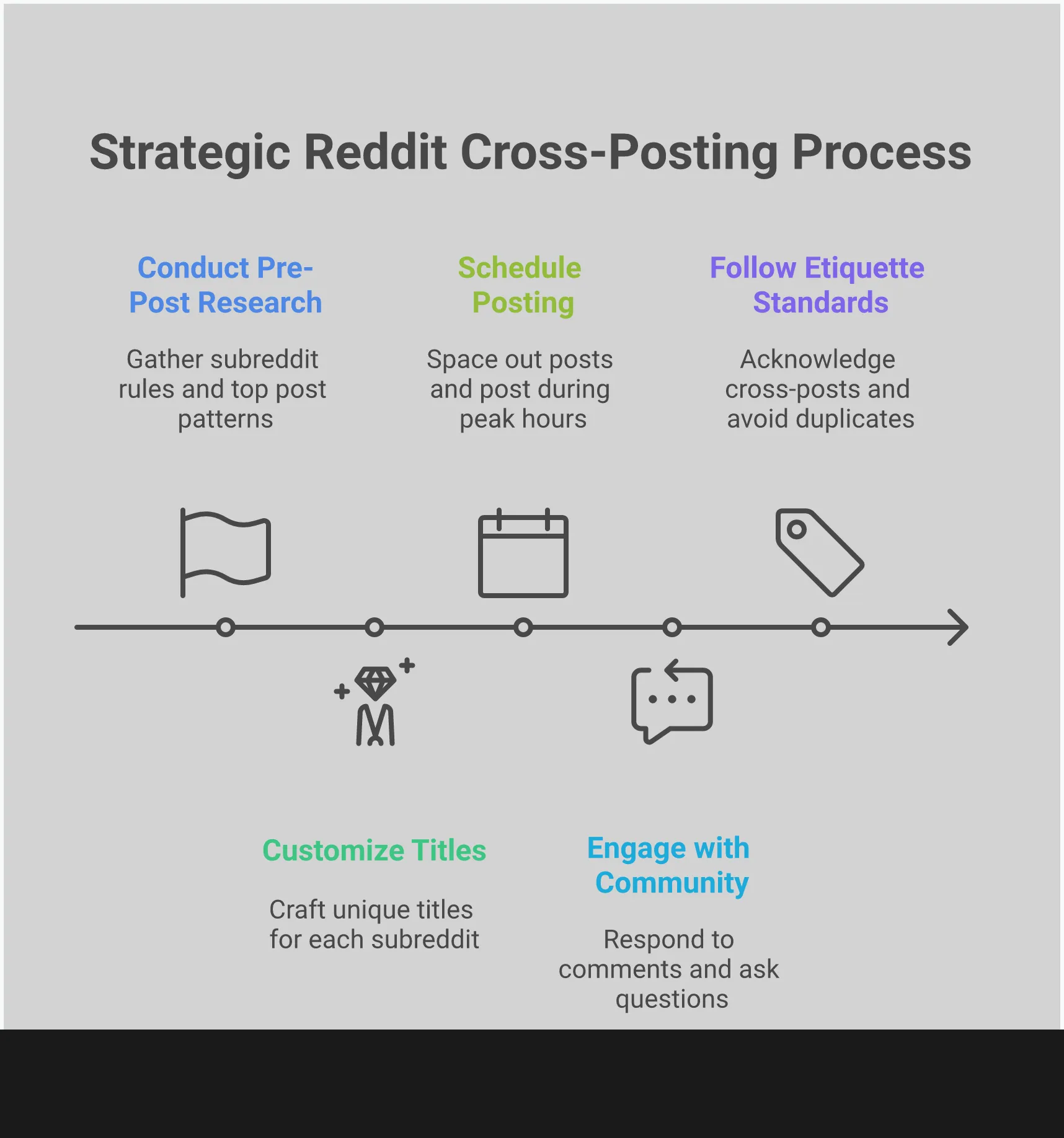
Always check the subreddit’s rules in the sidebar before posting anything. Each community has its own guidelines about sharing your own content, original posts, and content from other places. Some don’t allow certain types of posts at all, while others only permit them on specific days. Following these rules will help you avoid having your post removed and ensure you make a good impression.
Joining Reddit is like walking into a party – you wouldn’t immediately start talking without getting a sense of the atmosphere, would you? It’s best to approach Reddit carefully. Before posting, look for rules about self-promotion or how to label your posts (often called ‘flair’). Spending just 30 seconds to read the rules can prevent your content from being removed later.
Tailor Your Post for Each Community
Using the same title for every post is a sign you’re simply sharing content widely without considering the audience. While your work might fit in places like r/gaming, r/art, or a game-specific subreddit like r/Palworld, each community has different interests. Make sure your title and initial comment are relevant to the specific conversation happening in each subreddit.
When posting to a specific game community, share some background about the game’s story that inspired your work. If you’re posting art, discuss your process or materials. The key is to make sure your post is relevant and interesting to that community. If you can’t find a good way to connect your post to the group, it might be better to share it elsewhere.
Don’t Spam: Space Out Your Posts
It’s tempting to share your work widely right away, but try to pace yourself. Posting the same image to multiple subreddits in a short period can appear as spam to users and Reddit’s systems. This could lead to your posts being automatically flagged and removed, even if you haven’t violated any rules.
Don’t rush sharing your work everywhere at once. Start by posting it in a community you enjoy and interact with the responses. After a few hours, or even the next day, you can share it elsewhere with a new title. This helps each post gain traction naturally and shows you’re interested in genuine engagement, not just collecting points.
To Apologize or Not to Apologize for Cross-Posting?
You’ve created amazing Diablo 4 fan art and want to share it with the world! You post it on subreddits like r/Diablo, r/ImaginaryHorrors, and r/Art, but then start to worry – should you apologize for sharing it in multiple places? It’s a common concern, and there’s no easy answer. Whether or not you should apologize depends on how you share it and where.
It’s often natural to apologize, but as a creator, overdoing it can actually make you seem less sure of your work. Acknowledging others and their perspectives is important, though, and shows respect. Let’s look at when a quick note is helpful, and when saying ‘sorry’ might actually have a negative impact on how people receive your content.
When an Apology Helps
Instead of apologizing for posting in multiple subreddits, consider it a simple notification. Letting each community know you’ve cross-posted shows you respect their space and are being upfront. It assures moderators and members that you’re sharing your work thoughtfully, believing they’ll be interested. This small gesture can build positive relationships and even bring together fans from different communities.
To avoid issues when sharing content across different subreddits, it’s helpful to add a note like “(x-post from r/Palworld)” to your title or mention that you’ve also posted it in another subreddit, such as “Hey everyone, I shared this in the main gaming sub too!” This simple step shows respect for each community and acknowledges they aren’t just being used as a place to share links.
When “Sorry” Makes You Look Bad
You know, I’ve noticed something about posting art online. A little heads-up is okay, but a big apology before you share? It can actually hurt more than help! I’ve seen posts that start with “Sorry for the cross-post…” and honestly, it just makes the artist seem unsure of themselves. It feels less like they’re excited to share and more like they’re begging for approval. Seriously, your art is amazing – you shouldn’t have to apologize for wanting to show it off! Just post it and let your work shine – that’s what people want to see!
Don’t apologize for sharing your work—instead, connect with people! Start conversations by asking questions, share interesting details about how you create, and respond to comments you receive. Focus on building a community around your passion, rather than feeling like you need to apologize for it.
Find the Best Subreddits for Your Gaming Art
Sharing your art on Reddit is a bit like picking the best gear in Warzone – there’s no one-size-fits-all solution. It’s important to be thoughtful about where you post. Instead of sharing your work on every subreddit, take the time to find communities that genuinely appreciate what you create. This will help you get more valuable feedback and connect with others who love and create similar art.
Niche vs. Broad Art Communities
When you’re ready to share your work, you’ll find two main types of subreddits: large, general ones and smaller, more focused ones. Big communities, like r/art, have a huge audience, which can get your work seen by a lot of people. However, your amazing Diablo fan art might get overlooked among many other kinds of art. Smaller, niche subreddits focus on specific interests and have a more dedicated audience. These communities often have specific rules, and may not allow cross-posting. Always check the rules in the sidebar before you post to make sure your art is a good fit.
Discover Art-Focused Gaming Hubs
If you’re looking for places to share your gaming art, a good first step is to check out general art communities like r/Artshub and r/Artsphere. These are hubs where artists connect and discover new communities – think of them as starting points for finding the perfect subreddit for your work. Don’t forget to search for the official subreddit of the game you’re creating art for, such as r/palworld or r/Genshin_Impact. Within those communities, look for tags like “Fan Art” or “OC” (Original Content), as those groups are usually eager to see what fans create. For a more comprehensive guide to art communities on Reddit, check out this resource.
Understand Each Community’s Vibe
Each subreddit has a unique atmosphere. Some are lighthearted and filled with jokes, while others prioritize thoughtful discussion and feedback. Before you share anything, take a moment to observe the community. Check out popular posts and comments to understand what’s accepted and appreciated. Is it a friendly place for newcomers, or is it aimed at experts? Getting a sense of the community’s style will help you write titles and comments that fit in. You might even find that some groups actively debate their own guidelines, like whether sharing posts from other subreddits is okay. Knowing this background will significantly improve how your content is received.
Brace for Impact: What to Expect from Redditors
Sharing your art online can be daunting, like sending a character into a difficult fight – you hope it goes well, but you need to be ready for anything. Reddit has a huge and diverse audience, so you’ll get all sorts of reactions, from enthusiastic supporters to very particular community members, and even the occasional negative comment. The best approach is to be prepared for a mix of positive, strange, and critical feedback. Don’t let the possibility of a harsh comment prevent you from sharing your work with people who will truly appreciate it.
The Good: Praise and Helpful Critiques
Don’t let critics get you down! For every negative comment, there are many more people online who are truly excited about your art. Gaming communities, especially, are full of enthusiastic fans who love to see creative interpretations of their favorite games. When you share your work with the right audience, you’ll find plenty of encouragement, questions about your techniques, and helpful advice. The key is to be relaxed and authentic – just share what you create in places where you think people will enjoy it, as one online artist put it.
The Weird: Community-Specific Reactions
Each subreddit feels like its own little world, with its own unique humor, shared references, and unspoken guidelines. What’s popular in one community might not be well-received – or could even be taken down – in another. For instance, some subreddits strongly dislike when posts are shared from other communities. Before you post, it’s important to get a feel for the specific culture and rules to avoid any misunderstandings. This isn’t a negative thing – it’s actually what makes each subreddit special! Spend a little time observing before participating – it’ll help you avoid confusion and fit right in.
The Ugly: How to Handle Negative Comments
Okay, so I’ve learned that putting my work online means I’m gonna get some negativity, and honestly, that’s just part of the deal. Some of it might be fair criticism that I can actually learn from, but a lot of it will just be… well, people being mean. I’m trying to get better at figuring out which is which. Especially when it comes to Reddit, you need to be able to brush off the hate. Seriously, don’t even bother arguing with trolls – it’s a waste of time. I’m focusing on the people who do like my work, and I’m trying to take any constructive feedback seriously. I’m realizing not everyone is going to love what I create, and that’s totally fine! The people who connect with it are the ones who matter to me.
Common Cross-Posting Mistakes to Avoid
It should be enjoyable to share your artwork online, but it’s easy to make mistakes that can ruin a good post. People on platforms like Reddit are quick to recognize and criticize posts that seem like simple self-promotion. Luckily, these errors are simple to avoid if you know what to watch out for. By being respectful of each online community and putting in a little effort, you can ensure your art receives a positive response. Let’s look at common mistakes so you can share your work effectively.
The “Copy-Paste-Spam” Approach
It’s easy to fall into the trap of posting the same thing to many different subreddits at once, but that’s a surefire way to irritate people. Remember, each subreddit is a distinct community with its own unique vibe, humor, and rules. A generic, copied-and-pasted post feels impersonal and looks like spam. To succeed with Reddit marketing, you need to understand who you’re talking to. Spend some time observing each subreddit before posting to get a feel for its culture. A little effort to tailor your message shows you’re part of the community, not just trying to promote yourself.
Ignoring the Rules
Each subreddit has its own unique rules, typically listed in the sidebar or a pinned announcement. It’s important to read these rules before posting, as ignoring them can lead to problems. Many communities have specific guidelines on things like self-promotion, how often you can post, and whether sharing content from other subreddits is allowed. Some subreddits automatically block cross-posts, while others rely on moderators to remove rule violations and potentially warn or ban users. Taking just a couple of minutes to review the rules before posting can prevent issues and help you build a good reputation. If you’re new to Reddit, r/NewToReddit is a helpful resource for general questions.
Posting and Ghosting
When you share your art online, don’t just post it and leave. Reddit is all about connecting with others, and that means being responsive. Stay after you post to chat with people, answer questions, and thank those who leave comments. Being active shows you care about the community and value their feedback, not just the number of views. As one artist put it, just be friendly and share your work with people who enjoy it. This helps build good relationships and makes people more likely to remember you and your art.
How to Share Your Gaming Art Like a Pro
Simply posting your art on Reddit isn’t enough to gain attention. To truly connect with people and get your work seen, you need a plan. Think of it as joining a discussion, not just broadcasting to an audience. A little effort in crafting your posts and interacting with the community can transform a simple share into a valuable connection that helps you stand out. These tips will help you go from being just another user to a recognized artist in the gaming communities you enjoy.
Write Titles That Fit Each Community
Don’t settle for a simple title like “My Gaming Fan Art.” Each online community, like a subreddit, has its own unique style and sense of humor. A title that works well in a general art forum might not resonate with a specific gaming community like r/diablo4. Before you post, take a few minutes to browse and see what kind of titles are popular. Do top posts use memes, or are they direct and to the point? Customizing your title to fit the community shows you understand their culture. For instance, instead of just saying “Palworld Art,” try something like, “I drew my Grizzbolt after he single-handedly defended our base.” This is more detailed, tells a little story, and feels more personal.
Give Your Art a Backstory
Stories resonate with people much more than pictures alone. When you share your artwork, add some background information. Tell viewers what inspired it – maybe a great play in Warzone, a funny bug you found, or the mood of a particular game location. Explaining your inspiration or the moment that sparked your creativity helps people connect with your work. This turns a simple image into something people can talk about, making your art more memorable and encouraging them to do more than just quickly like it.
Actually Talk to People in the Comments
One of the worst things you can do as an artist online is simply post your work and then not interact with anyone. Remember, Reddit is a social site, and responding to comments is key to building a good reputation. When people comment, be sure to reply! Thank them for kind words, explain how you created your art, and be open to helpful feedback. This lets you connect with other artists and fans, and shows people you’re a genuine person who appreciates their thoughts – not just someone sharing links. Responding to comments is the best way to turn people who casually view your art into dedicated followers.
Become a Valued Community Member, Not Just a Poster
Okay, so I’ve learned the hard way that just dropping my art on Reddit doesn’t really work. It’s not enough to just post and run. You actually have to be part of the community. It’s like walking into a local game shop – you wouldn’t just tape up a flyer and leave, right? You’d talk to people, see what everyone else is into, become a regular. That’s what I need to do here too. Redditors can spot self-promotion a mile away, and they really appreciate when you actually engage and become a genuine member of the group.
Truly being part of a community means going beyond just replying to comments on your own content. It’s about actively participating in discussions, appreciating the work of others, and getting to know what makes each online space special. When you put effort into a community, people are much more likely to be enthusiastic when you share your own creations. This changes how you’re seen – from simply promoting your work to contributing something for the group. This approach leads to more supportive feedback and helps you build genuine relationships with others who share your interests.
Do More Than Just Self-Promote
Reddit is good at spotting and rejecting self-promotion that feels like spam, and users will often point it out. The best approach is to become an active member of the community before sharing your own work. Get to know your audience and the subreddit itself – spend time upvoting posts you like, leaving meaningful comments on other people’s creations, and joining conversations. By genuinely engaging with the community first, you demonstrate that you’re a participant, not just someone trying to advertise. This makes sharing your art feel like a natural part of the community, rather than a blatant ad.
Lift Up Other Artists
As a big fan, I always think it’s awesome when people in the community lift each other up. It’s not just about getting your own work seen, you know? I really try to share the art I love from other fans. If I see a fantastic piece of Diablo fan art, I make sure to leave a thoughtful comment – something more than just ‘cool!’ – and if I think another subreddit would enjoy it, I’ll share it (always giving credit to the original artist, of course). It’s just a great way to help other artists get noticed, and honestly, it usually comes back around – when you support others, they’re more likely to support you too. It creates a really positive and collaborative vibe that makes the whole community better for everyone.
Make Art That Connects
Each online community, like a subreddit, develops its own unique humor, beloved figures, and overall vibe. What’s popular in one group might not be as well-received in another, so it’s important to understand what each audience expects. Before creating art for a specific gaming community, take the time to learn about their culture. What memes are trending in the Honkai: Star Rail subreddit? What are people currently arguing about in r/Warzone? When your art references these shared jokes and discussions, it shows you’re part of the community, not just someone looking for likes. This personal touch makes your work more meaningful and helps it connect with people on a deeper level.
Related Articles
- Deus Ex LFG: Connect with Other Augs in LFG Feature on Z League App
Frequently Asked Questions
It’s hard to say exactly how many subreddits are too many to post your art to, but it’s better to focus on quality over simply sharing everywhere. Posting to three or four communities that are a really good fit for your work – and where you’ve taken the time to write a good title and interact with other members – will get you much better results than posting to ten random places. If you’re struggling to find a way to share your art that feels natural in a specific community, it probably isn’t the right place for it.
Okay, so I’m trying to figure out what to do if a subreddit’s rules about sharing posts to other subreddits aren’t super clear. What I’ve learned is, it’s always better to be safe than sorry! I think the best thing to do is check out how other artists are posting their work there first, just to get a feel for the vibe. And if I’m still not sure? I’ll send a nice message to the mods asking for a little guidance. It shows I care about following their rules and want to be a good member of the community, and that always makes a good impression, right?
It’s frustrating when a post is removed, especially if you believe you followed the rules. Remember, removals happen for many reasons – sometimes it’s an automated filter, or a rule you might have missed. If this happens, politely message the moderators to ask why. The best thing to do is learn from it and carefully review the rules before posting again.
Yes, it’s perfectly fine to ignore negative comments. It’s important to be able to tell the difference between helpful feedback and simple negativity. You don’t have to respond to people who are just trying to upset you. Instead, focus on positive interactions and those who value what you do.
You can share links to your art portfolio or social media, but it depends on the specific rules of each subreddit. Some allow links in comments, while others don’t allow them at all. Always check the subreddit’s rules (usually in the sidebar) before posting any links. A good way to make your work visible is to add your portfolio and social media links to your Reddit profile page.
Read More
- United Airlines can now kick passengers off flights and ban them for not using headphones
- Crimson Desert: Disconnected Truth Puzzle Guide
- Katanire’s Yae Miko Cosplay: Genshin Impact Masterpiece
- How to Get to the Undercoast in Esoteric Ebb
- All Golden Ball Locations in Yakuza Kiwami 3 & Dark Ties
- All Itzaland Animal Locations in Infinity Nikki
- Zendaya’s 4 Big 2026 Movies Could Beat Brie Larson’s Box 2019 Office Record
- All 9 Coalition Heroes In Invincible Season 4 & Their Powers
- HBO’s Harry Potter Is Already Breaking My Heart
- Gold Rate Forecast
2026-01-29 14:05