
You’ve woken up, made coffee, and now there’s a huge update for Warzone – a 5,000-word patch note! It’s a race to share the important changes with your audience before anyone else, but that much text can be overwhelming. That’s where a good summarization tool comes in handy. Instead of spending hours reading, these tools quickly condense long documents into easy-to-understand summaries. This lets you focus on making content and playing the game, instead of just reading about it.
Key Takeaways
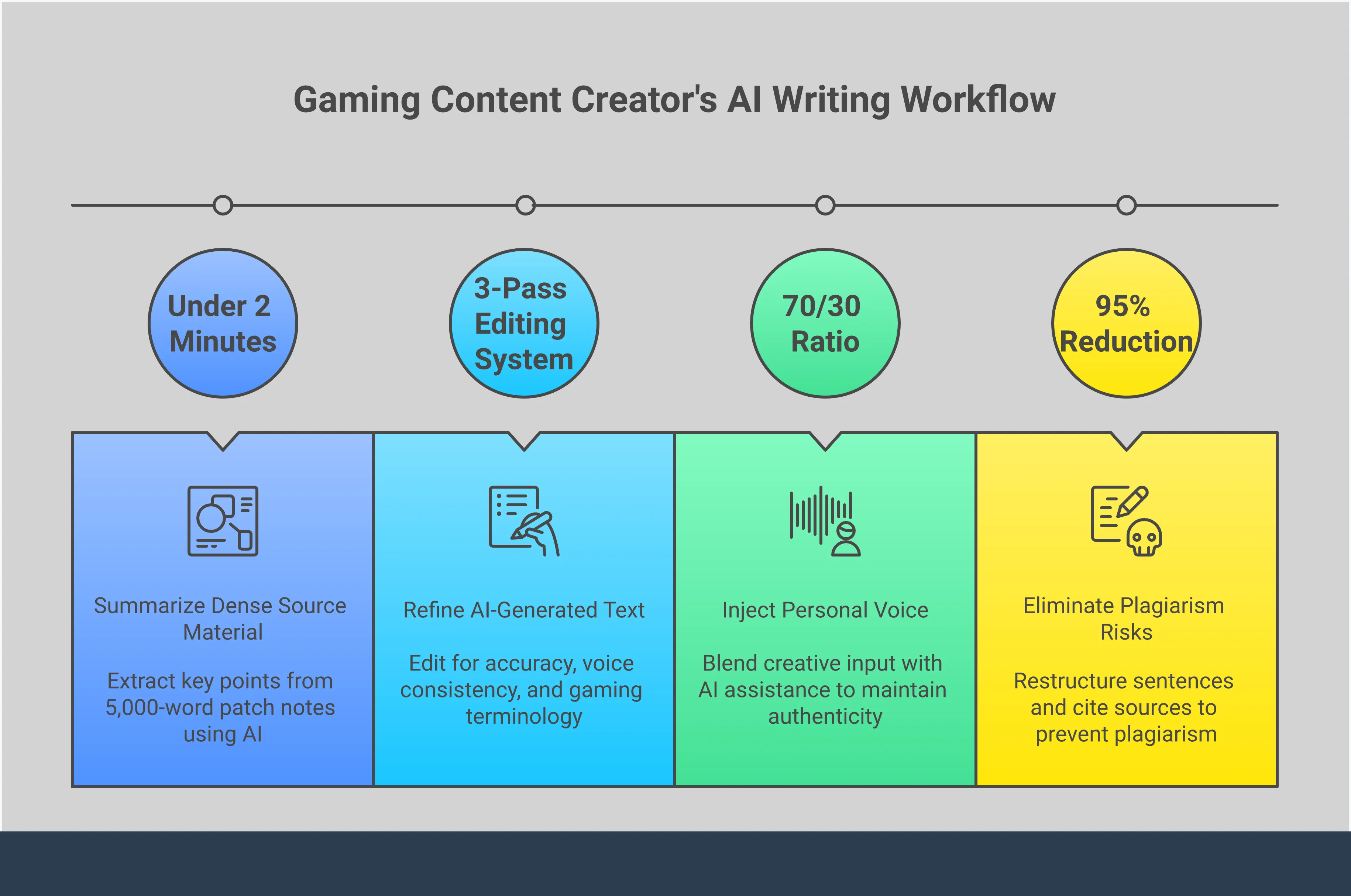
- Streamline Your Content Creation: Use these tools to efficiently condense dense information like patch notes or game guides, freeing you up to focus on adding your unique analysis and personality.
- Select a Tool That Understands Gaming: Prioritize tools with context-aware AI that can handle gaming slang, a built-in plagiarism checker to ensure originality, and customizable styles to match your content’s tone.
- Treat AI as an Assistant, Not a Replacement: Always review and edit the output to ensure accuracy and preserve your voice. The goal is to enhance your workflow, not to let automation replace your creative input.
What Are Summarizing and Paraphrasing Tools?
Ever find yourself trying to explain complicated game updates, like those in Warzone, or a detailed character build to your audience? It’s tough to share important details without simply reading long blocks of text. That’s where paraphrasing and summarizing tools can help. They’re like AI assistants designed to make creating content easier.
Paraphrasing tools use advanced technology to rewrite text using different words, but keeping the original meaning intact. They don’t just replace words with synonyms; instead, they restructure entire sentences to help you create fresh, well-written content. This is especially helpful when you’re using information from sources like game wikis, news articles, or developer blogs and want to express it in your own style for things like blog posts or video scripts.
Tools that summarize text are made to shorten long articles or documents into brief, easy-to-understand summaries. For example, you could take a lengthy 3,000-word blog post and turn it into a few quick bullet points for your online community. These tools use smart technology to identify the most important information, and often let you choose how short you want the summary to be. Knowing how to both write clearly and summarize effectively is crucial for creators who want to share information quickly and accurately, freeing up more time to enjoy their work.
Why Gamers and Creators Need Them
Being a gaming content creator is demanding work. You’re always busy – whether it’s writing guides for games like Diablo 4, making videos about Warzone builds, or staying updated on game changes. That’s where tools that summarize and reword information can be a huge help, letting you work more efficiently.
Remember the last big update to a game you follow? Getting your thoughts out quickly is important, but you also want to be accurate and maintain your own voice. These tools can help you quickly summarize long developer posts and pull out the most important points for your audience. They can also translate complicated game terms into simpler language that new players can easily understand. It’s not about taking shortcuts—it’s about working smarter, not harder.
These tools do more than just save you time—they’re great for finding your own style. With so many creators talking about the same games, being original is key. A paraphrasing tool can help you cover popular topics, like a new character announcement in Honkai: Star Rail, in a unique way. It provides different ways to phrase things, letting you avoid simply repeating what others are saying and instead develop a distinctive voice. This is how you attract a dedicated audience who comes to you for your unique perspective.
These tools also offer valuable protection. When combining information from many sources, it’s easy to unintentionally use someone else’s wording. A good paraphrasing tool helps you rewrite material responsibly, ensuring your work is original and avoiding plagiarism. It’s a quick way to make your content more professional and allows you to concentrate on sharing your gaming expertise.
How These Tools Help You Avoid Plagiarism
Okay, so I’m building a new character in Diablo 4, and I need to write a guide or maybe even make a video about it. I definitely don’t want to copy anyone else’s work, but when you’re reading a ton of guides and lore, it’s super easy to accidentally end up using wording that’s way too similar to the original source. That’s where paraphrasing tools come in handy! They basically help me reword things and make sure my writing is original, so I’m not accidentally plagiarizing. They’re like a helpful teammate when I’m creating content.
Don’t think of these tools as simple word-swappers. They’re more like creative partners that completely rewrite and reorganize your sentences. A good tool won’t just replace a phrase like ‘powerful sword’ with ‘strong blade’ – it’ll rebuild the entire idea to make it sound like you wrote it. This helps you avoid accidental plagiarism by moving away from the original sentence structure, while still giving credit to the original source. You’re expressing the idea in your own unique way.
These tools are designed to save you time and give you peace of mind. Rewriting every source by hand can take a long time – time you’d likely prefer to spend actually enjoying and writing about the game. By handling the initial rewriting automatically, you can concentrate on what matters most: adding your own insights, personality, and unique take. They also provide a safety net, helping you create high-quality, original content quickly and confidently, without worrying about accidental plagiarism.
What to Look For in a Quality Tool
There are a lot of paraphrasing tools available, and it’s hard to know which ones are actually good. Some tools produce awkward, confusing results that require more editing than simply rewriting the text yourself. What you really need is a helpful tool that understands your meaning, not one that just replaces words randomly.
A great writing tool does more than just swap words. It understands what you’re writing about, helps you keep your personal style, and lets you fully control the final result. Whether you’re crafting a thorough guide to Warzone weapons or a humorous explanation of a game feature, the best tools feel like collaborators. Here’s what to look for to find the top options.
Rewrites That Understand Context
Effective paraphrasing tools, particularly for gaming content, need to grasp the meaning behind the words. Simple tools often misinterpret gaming slang like “nerf,” “gank,” and “meta,” resulting in clumsy or incorrect rewrites. A strong tool will recognize you’re discussing game strategies, not building projects. The best paraphrasers also offer different writing styles – such as formal, brief, or imaginative – to fit the tone of your writing. Being able to adjust how strongly synonyms are used is also helpful, letting you control how much the text changes and ensuring it still sounds natural.
Built-In Plagiarism Detection
It’s easy to unintentionally copy phrases from your sources, even when you’re trying to create original content. That’s why a plagiarism checker is so important. A good tool will scan your writing and highlight any sections that are too similar to existing material. This isn’t just about avoiding penalties—it’s about making sure your work is genuinely your own. These tools help you rewrite sentences and come up with new ideas, and the plagiarism check provides a final review before you share your work, ensuring it’s unique and gives credit where it’s due.
Customizable Styles and Lengths
As a gamer, I create content for tons of different platforms – Twitter, YouTube, my blog, you name it. That means I need a writing tool that can keep up! It’s awesome when I can tweak the output to fit exactly what I need. Sometimes I need a short, snappy description for a video, and other times I want a longer, more detailed post for my blog. It’s a huge time-saver when the tool lets me control how long the summary is, so I don’t have to edit it all myself. Plus, being able to change the writing style – like going from funny and casual to super informative – helps me keep my voice consistent everywhere I post. It’s all about making things easy and sounding like me.
A User-Friendly Interface with Real-Time Edits
The main benefit of using a writing tool is to work faster and with less effort, so it’s important that the tool is easy to use. The best ones have a simple, clear design. You should be able to see suggestions as you write and quickly choose to accept, reject, or change them – this keeps you in control. Keep in mind that these tools are helpers, not replacements for your own writing abilities. A well-designed platform lets you easily blend the tool’s suggestions with your own style, so the final result still sounds like you.
Our Top Picks for Online Writing Tools
Let’s dive into some really useful tools. I’ve tested a lot of options and found five online writing tools that can genuinely help gaming content creators. Whether you’re writing in-depth guides – like a build for Diablo 4 – summarizing game updates, or crafting a compelling review, these tools have something to offer. Each one excels in a different way, from complete editing platforms to powerful summarizers that can handle even complex game lore. Consider them partners to help you write more efficiently, refine your work, and ensure your voice stands out, without getting stuck on minor details.
UniPapers: For Smart Summaries and Plagiarism Checks
Explaining complicated game details, like rules or quests, can be really challenging. UniPapers helps with that! Its summarizer quickly identifies the key information in long articles or reviews, making it perfect for sharing with your audience. It also includes a plagiarism checker, so you can be sure your writing – even about something complex like Palworld – is entirely your own. Overall, it’s a simple, powerful tool for clear and confident communication.
Scribbr: Your All-in-One Writing Assistant
Scribbr is like a helpful assistant for all your writing needs. It does more than just reword sentences – it’s a complete writing toolkit. It combines a grammar checker, citation generator, and rephrasing tool into one simple program. This is especially useful for large projects, such as detailed guides that use information from many different sources. The grammar checker helps you write clearly and professionally, and the citation generator makes it easy to properly credit your sources – whether they’re official websites or interviews. Ultimately, Scribbr helps you create writing that is clear, trustworthy, and easy to understand.
PaperGuide: The Academic-Focused Option
You might think a research-focused tool is too serious for gaming, but consider this: when you’re writing detailed analyses of complex game stories or systems, accuracy and originality are crucial. These tools often have excellent plagiarism checkers, which are incredibly helpful for any content creator who takes their work seriously. For example, if you’re exploring the detailed backstory of Honkai: Star Rail and using both fan theories and official information, this type of tool helps ensure your writing is original and properly acknowledges its sources. It’s about giving credit where it’s due and establishing yourself as a knowledgeable voice in the gaming community.
ReadPartner: To Simplify Dense Text
Ever feel overwhelmed by long lists of updates for games like Warzone? ReadPartner solves that problem. It uses artificial intelligence to quickly turn large amounts of text into short, easy-to-understand summaries. This is ideal for gamers and content creators who need to quickly grasp the important details without spending hours reading. You can use it to quickly understand new game updates, get the main ideas from lengthy guides, or refresh your memory on game lore. It’s designed to save you time and help you focus on what matters most – playing and creating!
Prepostseo: The Multi-Tool Platform
If you’re someone who likes having lots of tools available, Prepostseo is a great choice. Think of it as a complete toolkit for writers – it’s not just one tool, but many! While it offers a variety of features, its paraphrasing tool is particularly useful for gaming bloggers. It helps you find new and interesting ways to describe in-game action, suggesting different words and sentence structures to avoid repeating yourself. Tired of calling every boss fight “epic”? This tool can help you create more engaging and dynamic content that will keep your readers hooked.
How Do These Tools Actually Work?
Imagine customizing your go-to weapon in Warzone – you’re still using the same base gun, but changing its attachments to tweak how it performs. Paraphrasing tools work similarly with text. Instead of just replacing a few words, they essentially rewrite the whole thing.
These tools work by using complex algorithms to truly understand the meaning of your text. They go far beyond simply swapping words for synonyms, which often results in awkward phrasing. Instead, they skillfully rewrite sentences – rearranging parts and changing the order of words – to create fresh, natural-sounding text that differs significantly from the original. This is crucial for avoiding plagiarism by ensuring you’re not just replicating the original sentence structure.
The true power of these tools lies in the artificial intelligence behind them. A good AI paraphraser doesn’t just swap words; it understands what those words mean in context, which is especially important for gaming. For example, it knows ‘farming’ refers to gathering resources in a game, not agriculture, and that a ‘crit’ is a positive outcome. This understanding allows it to suggest relevant synonyms and reword sentences while keeping the original meaning intact. Plus, many tools offer different writing styles – like formal, brief, or imaginative – and include features to check your grammar and ensure your work is original.
Common Pitfalls to Watch Out For
Paraphrasing tools are helpful, but they aren’t perfect. They can assist with some of the work, like a co-pilot, but you still need to oversee the process and ensure everything is correct. Simply trusting them without checking can lead to errors, which are easily avoided if you understand their weaknesses. Before fully integrating these tools into your work, it’s important to be aware of what they can’t do. Knowing these limitations will help you use them well and maintain the quality of your writing.
The Risk of Accidental Plagiarism
It’s a bit surprising, but tools meant to prevent plagiarism can sometimes accidentally create it. The problem is that many simple paraphrasing tools only replace words with synonyms, leaving the original sentence structure intact. This practice, known as “patchwriting,” is still considered a form of plagiarism. Real paraphrasing means completely rewriting an idea using your own words and sentence structure. If a tool’s output closely resembles the original text, you could unintentionally plagiarize. Always carefully compare the rewritten text to the original source to make sure it’s truly a new version.
Losing Your Original Meaning
As a gamer, I’ve noticed that context is huge. We have our own language – slang, jokes, and specific terms – and a regular AI just doesn’t get it. I’ve seen tools completely misunderstand things like someone saying their character ‘build is broken’ or that a recent update ‘nerfed’ their favorite character. It might rewrite the sentence to be grammatically correct, but it totally misses the meaning and the feeling behind it. It’s really hard for an AI to understand what someone means, and it can easily remove the personality that makes gaming content fun – especially stuff like the sarcastic humor you see in communities like Palworld. It’s about more than just correct grammar; it’s about capturing the original intent.
Inconsistent or Inaccurate Rewrites
Paraphrasing tools don’t always get it right – sometimes the results are strange and hard to understand. Sentences can be clumsy or simply not make sense, especially when dealing with complicated topics like technical details or game guides. A bad paraphrase isn’t just poorly written; it can actually spread wrong information. For example, if a tool misstates the stats of a new weapon in a game like Warzone, it could cause everyone reading it to create an ineffective setup. That’s why it’s crucial to always carefully review any paraphrased text to make sure it’s clear, accurate, and reads smoothly.
Relying Too Heavily on Automation
The biggest risk is letting the tool write for you completely. What makes your content special is your individual voice and how you see things. If you depend too much on automation, your writing can become bland and lose its personality. Remember, people want to hear your thoughts on a topic like the latest Diablo 4 update – not something a machine created. These tools are best used to help you get started when you’re stuck, or to refine your writing, not to replace your own creativity. Relying on them too much can also raise ethical concerns about who is actually responsible for the content.
How to Choose the Right Tool for Your Gaming Content
Choosing the right writing tool can be tough, with so many options available. It’s a bit like selecting a character at the beginning of a video game – the best one for you depends on how you write and what you’re trying to create. First, consider the type of content you’ll be working on. Are you writing something technical, like a guide with specific terms? Or something more lighthearted and creative? Knowing this will help you make the right choice.
Once you’ve decided what you want to achieve, it’s time to consider the technical details. When choosing a paraphrasing tool, focus on one that understands the specific language of gaming – it shouldn’t just replace words without understanding the meaning. Useful features include different writing styles (like formal, creative, or brief) and the ability to control how much the wording changes. Most importantly, make sure it has a plagiarism checker, as this will help you avoid accidentally copying content from other sources.
Don’t forget about how easy the tool is to use. A simple, uncluttered interface, without lots of ads, will help you concentrate on your writing. Also, make sure it can handle the length of your projects. If you’re writing something long, like an in-depth article about Diablo’s history, you need a tool that won’t freeze up. Luckily, many of these tools offer free trials, so try a few to find the one that works best for you.
How to Use Your Tool Effectively
Great, you’ve chosen a tool and are ready to begin! Before you start adding text, let’s plan how to use it effectively. Think of these tools like a powerful weapon in a video game – you wouldn’t rush into a battle without knowing how it works, would you? The same idea applies here: understanding the tool’s strengths and weaknesses is key.
To get the most out of a paraphrasing tool, think of it as a helper, not a replacement for your own skills. Your ideas, expertise, and individual style should always be the focus. The tool can assist with some of the more tedious parts of writing, letting you create high-quality content more quickly and efficiently – while still maintaining your unique voice. Here’s how to stay in control and make the most of this partnership.
Always Review and Edit the Output
Here’s a key principle: always review and revise AI-generated text carefully. While AI is powerful, it doesn’t fully grasp the subtleties of gaming, like humor or specific terminology. It might misinterpret jokes or awkwardly phrase in-game item names. AI tools are great for speeding up your writing and offering fresh ideas, but you’re responsible for the final quality. Always combine the AI’s suggestions with your own editing to ensure everything is accurate, clear, and properly cited to prevent plagiarism. Think of the AI’s output as a first draft – you need to refine it to make it truly excellent.
Keep Your Unique Voice and Style
Okay, so when I’m writing a guide or review, the absolute last thing I want is for it to sound like a robot wrote it. Seriously, my personality is what makes my stuff interesting and keeps people coming back for more. I’ll sometimes use a paraphrasing tool to help me reword things and avoid accidentally copying stuff, but I always have to go back and tweak it. I read it out loud – does it actually sound like me? If it doesn’t, I change it until it does. It’s about bringing my own voice, my jokes, and my love for the game to the table. People connect with that, not just dry facts. A tool can help, but it shouldn’t erase who I am as a writer. It’s the difference between a boring wiki page and something really engaging, like a deep dive into all the hilarious F.A.R.M. team memes in Honkai: Star Rail.
Use Them as an Aid, Not a Replacement
These tools are best seen as collaborators, helping you brainstorm and overcome writing hurdles, like simplifying complex game updates or finding the right words. However, using them to write entire articles can be problematic. It raises ethical concerns about who truly created the content, and your audience wants to hear your unique perspective – your reaction to something like the new Diablo 4 trailer, not just a basic overview. The aim is to make your work easier, not to replace your own ideas and creativity. Let these tools handle the repetitive tasks so you can concentrate on sharing what you love about gaming.
Frequently Asked Questions
Whether using a paraphrasing tool is considered cheating depends on how you use it. Copying someone else’s work and presenting it as your own is unethical. However, using a tool to help with writer’s block, improve awkward sentences, or simplify complex ideas is perfectly acceptable. The key is to use it to improve your own writing, not to replace your own thinking and creativity.
Even if you use a paraphrasing tool, you still need to cite your sources. These tools only change the wording, not who originally came up with the idea. If you’re sharing information or concepts from somewhere else – like a blog or a wiki – you must give credit to the original author. Citing your sources is essential for creating trustworthy and respectful content.
Do these tools understand gaming language, including slang? The better ones are surprisingly good at it, but they’re not flawless. A good tool using smart AI can usually distinguish between gaming terms like ‘farming’ for items in a game like Diablo and actual farming. However, it’s still crucial to double-check the results to ensure it hasn’t misunderstood words like ‘nerf’ or ‘meta,’ or any unique slang used by your game’s community.
Want to keep your writing sounding like you? Think of the tool’s output as a starting point, not the finished version. Read it aloud – does it flow like you normally speak? Does it capture your usual tone, whether you’re funny, serious, or enthusiastic? Feel free to change words, move sentences around, and add your own personality. The tool can give you a new framework, but you bring the voice and feeling to the writing.
The biggest mistake people make with these tools is simply believing everything they generate. Don’t just copy and paste! Always review the output carefully, as it can contain awkward wording, incorrect information, or sentences that change the intended meaning. Take the time to read, edit, and polish the text so it’s accurate, clear, and sounds like you.
Read More
- United Airlines can now kick passengers off flights and ban them for not using headphones
- All Golden Ball Locations in Yakuza Kiwami 3 & Dark Ties
- Best Zombie Movies (October 2025)
- 15 Lost Disney Movies That Will Never Be Released
- These are the 25 best PlayStation 5 games
- Every Major Assassin’s Creed DLC, Ranked
- Adolescence’s Co-Creator Is Making A Lord Of The Flies Show. Everything We Know About The Book-To-Screen Adaptation
- How to Get to the Undercoast in Esoteric Ebb
- What are the Minecraft Far Lands & how to get there
- How To Find The Uxantis Buried Treasure In GreedFall: The Dying World
2025-12-01 17:50